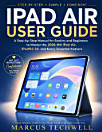
IPAD PRO M5 USER GUIDE: The Complete 2025-2026 Manual to Master iPadOS 26, M5 Performance, Apple Pencil Pro, and Every Hidden Feature — Step-by-Step for Beginners and Seniors
About this ebook
Are you sure you're getting everything your iPad Pro M5 can do?
You invested in one of Apple's most powerful iPads. But if you're constantly searching for answers, avoiding unfamiliar settings, or wondering what certain features actually do, you may be using only a fraction of its potential.
What if you could finally stop guessing—and start using your iPad with confidence?
iPad Pro M5 User Guide is your clear, practical companion for turning a powerful device into a tool that genuinely works for you.
Inside, you'll discover how to:
Set up and personalize your iPad Pro M5 with confidence
Navigate iPadOS 26 using simple gestures, settings, and shortcuts
Unlock powerful multitasking and productivity features
Get more from Apple Pencil Pro for writing, drawing, and creativity
Discover useful hidden features you might otherwise overlook
Improve privacy, security, battery life, and everyday performance
Solve common problems without feeling overwhelmed
Make your iPad easier and more enjoyable for work, learning, creativity, and everyday life
No confusing technical jargon. No overwhelming explanations. No need to be a tech expert.
Every step is designed to be clear, practical, and easy to follow—whether you're a beginner, upgrading from an older iPad, or a senior who simply wants technology to feel less complicated.
Imagine opening your iPad and knowing exactly what to do.
Imagine discovering features you never knew existed.
Imagine replacing frustration with confidence—and finally making your iPad Pro M5 work the way you want it to.
Your iPad Is Powerful. Now Make It Work for You.
Don't let an incredible device become an expensive screen you only partially understand.
Get your copy today and start unlocking more of your iPad Pro M5—one simple step at a time.