About this ebook
Many smartphone manuals assume prior experience, leaving everyday users overwhelmed by complicated settings, hidden features, and unfamiliar terms. Whether you are transitioning from another phone or stepping into the world of smartphones for the very first time, figuring out the basics can feel like an unnecessary challenge.
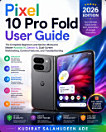
Google Pixel User Guide bridges that gap by offering a clear, reassuring roadmap designed specifically for beginners and seniors. Written with patience and structure, this comprehensive manual walks you through everything you need to know—from unboxing and first-time setup to mastering the camera, utilizing Gemini AI tools, protecting your privacy, and maximizing battery life.
BENEFITS
Streamline Setup: Effortlessly transfer contacts, photos, and messages from your old phone.
Capture Memories: Take stunning, professional-quality photos using Night Sight, Portrait mode, and Magic Eraser.
Leverage Smart AI Tools: Use Gemini and Call Screen to manage daily tasks, screen unwanted calls, and summarize important information.
Protect Your Privacy: Easily navigate security check-ups, screen locks, and permissions with complete confidence.
Optimize Battery and Performance: Learn healthy charging habits and practical adjustments that keep your phone running smoothly for years.
By the time you finish this book, your Pixel will feel less like a complicated device you are managing and more like a helpful tool working quietly in the background of your life.
Scroll up and click "Buy Now" to take control of your smartphone experience with confidence today!