About this ebook
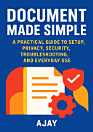
Capture the moments you love—without compromising privacy or security. Glitch Photo Made Simple is a practical, step-by-step guide that helps you set up, configure, and use Glitch Photo with confidence. Written for beginners and experienced users alike, this book walks you through essential workflows, from initial setup to everyday photo sharing and organization. Inside, you’ll learn how to protect your data with clear, actionable privacy and security practices. Understand how permissions work, what settings matter most, and how to reduce risk while still enjoying the features you want. You’ll also get troubleshooting guidance for common issues—so you spend less time stuck and more time creating. Whether you’re using Glitch Photo for personal albums, family sharing, or casual social posts, this guide makes the technology approachable. Expect straightforward explanations, practical tips, and “do this next” instructions that help you get the best results on real devices and real situations. If you’ve ever wondered how to optimize your setup, secure your account, fix glitches, or make Glitch Photo work the way you expect, this book is your go-to companion. Learn the essentials fast, avoid common mistakes, and build a smoother, safer photo experience from day one. Get Glitch Photo Made Simple and turn confusion into control.
Capture the moments you love—without compromising privacy or security. Glitch Photo Made Simple is a practical, step-by-step guide that helps you set up, configure, and use Glitch Photo with confidence. Written for beginners and experienced users alike, this book walks you through essential workf...
Discover more
About the author
Ajay is a practical tech educator focused on helping readers use everyday digital tools safely and confidently. With a clear, beginner-friendly approach, Ajay translates common setup, privacy, and security questions into straightforward steps you can follow right away. Passionate about problem-solving, Ajay also emphasizes real-world troubleshooting so readers can quickly fix issues and keep moving. When not writing, Ajay tests workflows, refines guidance, and works to make technology feel more understandable and accessible for everyone.
Ajay is a practical tech educator focused on helping readers use everyday digital tools safely and confidently. With a clear, beginner-friendly approach, Ajay translates common setup, privacy, and security questions into straightforward steps you can follow right away. Passionate about problem-so...
Rate this ebook
Tell us what you think.
Reading information
Smartphones and tablets
Install the Google Play Books app for Android and iPad/iPhone. It syncs automatically with your account and allows you to read online or offline wherever you are.
Laptops and computers
You can listen to audiobooks purchased on Google Play using your computer's web browser.
eReaders and other devices
To read on e-ink devices like Kobo eReaders, you'll need to download a file and transfer it to your device. Follow the detailed Help Center instructions to transfer the files to supported eReaders.