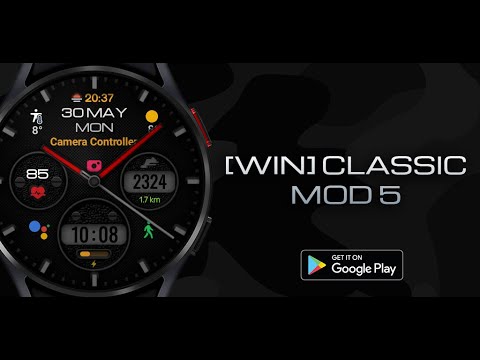

Classic MOD5 Modern watch face

star
139 reviews

Everyone
info
5K+
Downloads

Everyone
Learn more


About this app
New watch face format
Sporty Hybrid Watch Face for Wear OS – combines digital precision with analog style, featuring customizable complications, activity tracking, and a sleek, dynamic design for active lifestyles.
Basic moments
- A high resolution;
- Digital time in 12\24 hour format.
- Changeable colors
- Change the color of the hour and minute hands
- Ability to change Styles (backgrounds)
- Custom complications
- AOD mode full and minimal
Compatible with Wear OS devices running API level 30 and above, including Samsung Galaxy Watch 4, 5, 6, 7, 8 and Pixel Watch.
**Installation**
1. Install the watch face app on your phone.
2. Make sure your Wear OS watch is connected to your phone and uses the same Google account.
3. Select your watch as the installation device and complete the installation.
4. After installation, select the watch face from your watch face gallery.
If installation is delayed, check the internet connection on both devices, wait a minute or two, or restart your watch and try again.
**Customization**
• Touch and hold the watch face, then tap **Customize** to access the available settings.
• For the best experience, we recommend configuring the watch face directly on your watch. Video guide:
https://youtu.be/YPcpvbxABiA
**Support**
If you have any questions or installation issues, please contact: srt48rus@gmail.com
**More watch faces by WIN**
Explore other watch faces:
https://play.viewpro.live/store/apps/dev?id=6789054753742990227
Sporty Hybrid Watch Face for Wear OS – combines digital precision with analog style, featuring customizable complications, activity tracking, and a sleek, dynamic design for active lifestyles.
Basic moments
- A high resolution;
- Digital time in 12\24 hour format.
- Changeable colors
- Change the color of the hour and minute hands
- Ability to change Styles (backgrounds)
- Custom complications
- AOD mode full and minimal
Compatible with Wear OS devices running API level 30 and above, including Samsung Galaxy Watch 4, 5, 6, 7, 8 and Pixel Watch.
**Installation**
1. Install the watch face app on your phone.
2. Make sure your Wear OS watch is connected to your phone and uses the same Google account.
3. Select your watch as the installation device and complete the installation.
4. After installation, select the watch face from your watch face gallery.
If installation is delayed, check the internet connection on both devices, wait a minute or two, or restart your watch and try again.
**Customization**
• Touch and hold the watch face, then tap **Customize** to access the available settings.
• For the best experience, we recommend configuring the watch face directly on your watch. Video guide:
https://youtu.be/YPcpvbxABiA
**Support**
If you have any questions or installation issues, please contact: srt48rus@gmail.com
**More watch faces by WIN**
Explore other watch faces:
https://play.viewpro.live/store/apps/dev?id=6789054753742990227
Sporty Hybrid Watch Face for Wear OS
Updated on
Featured stories

Safety starts with understanding how developers collect and share your data. Data privacy and security practices may vary based on your use, region, and age. The developer provided this information and may update it over time.
- No data shared with third partiesLearn more about how developers declare sharing
- No data collectedLearn more about how developers declare collection


Ratings and reviews
116 reviews

Kevlar Kev
- Flag inappropriate
June 1, 2022
Somethings wrong when custimizing it. It goes to the main screen without completing it. Please look into it. Using s22ultra. Also, can you change the mile to km? I like the face but its frustrating to customize it.
WinWatchfaces
June 2, 2022
Hello, do the setup on the watch itself, if you use the Wearable app write to Samsung and ask why their app is not working! about KM and miles write me an email and I'll teach you.

William Scott Burr
- Flag inappropriate
June 5, 2022
I've been a big fan since Tizen. This watch face beats all! The amount of customization and details are unreal! Very nice! Look forward to the next one!

Mike Balmer
- Flag inappropriate
- Show review history
October 6, 2024
Nice looking watch face. My only gripe is that the step count section doesn't update automatically on my watch, Skagen Falster 6 running WearOS 3.5.
What’s new
Wear OS Update:
- Added ability to select Chance of Rain in Custom Complications
- Added ability to select Chance of Rain in Custom Complications
Everyone
Learn moreApp support
About the developer
Филатов Игорь Александрович
winwatchfaces@gmail.com
ул. Ескалиева, д. 148
кв. 21
090000 Уральск
Kazakhstan


