
CFS147 Pure Calendar
star
28 reviews

Everyone
info
500+
Downloads

Everyone
Learn more




About this app
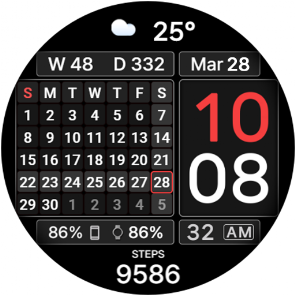
A stylish digital watch face for Wear OS with large time and a full calendar for the current month. The structured modern layout, clearly separated information zones, and excellent readability make it ideal for those who appreciate order and want the whole month visible directly on their watch.
Watch face features:
⏰ Digital time in 12/24 format depending on phone settings
0️⃣ Option to disable the leading zero
📅 Monthly calendar
🌤️ Weather and temperature
🔋 Watch battery level
👣 Steps
🎨 Multiple color schemes
⚙️ Complications and custom shortcuts
🌙 4 AOD styles with 4 brightness levels
The large digital time, full monthly calendar, and neatly organized information make this watch face both practical and elegant. Choose your preferred color scheme and keep essential information clearly organized throughout the day.
ℹ️ Availability of some functions, complications, weather information, and other displayed data may depend on your watch and phone model, installed apps, permissions, and system settings.
⚙️ Galaxy Wearable may not always correctly support customization of complex watch faces, so we recommend customizing directly on the watch.
To open settings, press and hold the watch screen.
⚠️ Touch zones are guaranteed to work only on Samsung watches.
📧 If you experience any difficulties using the watch face, please contact us. We will do our best to help:
seslihediyye@gmail.com
🌐 Installation instructions, customization and setup tips, and additional information:
https://cfswatchfaces.com
✈️ TELEGRAM:
https://t.me/CFS_WatchFaces
Thank you for choosing our watch faces!
Watch face features:
⏰ Digital time in 12/24 format depending on phone settings
0️⃣ Option to disable the leading zero
📅 Monthly calendar
🌤️ Weather and temperature
🔋 Watch battery level
👣 Steps
🎨 Multiple color schemes
⚙️ Complications and custom shortcuts
🌙 4 AOD styles with 4 brightness levels
The large digital time, full monthly calendar, and neatly organized information make this watch face both practical and elegant. Choose your preferred color scheme and keep essential information clearly organized throughout the day.
ℹ️ Availability of some functions, complications, weather information, and other displayed data may depend on your watch and phone model, installed apps, permissions, and system settings.
⚙️ Galaxy Wearable may not always correctly support customization of complex watch faces, so we recommend customizing directly on the watch.
To open settings, press and hold the watch screen.
⚠️ Touch zones are guaranteed to work only on Samsung watches.
📧 If you experience any difficulties using the watch face, please contact us. We will do our best to help:
seslihediyye@gmail.com
🌐 Installation instructions, customization and setup tips, and additional information:
https://cfswatchfaces.com
✈️ TELEGRAM:
https://t.me/CFS_WatchFaces
Thank you for choosing our watch faces!
Wear OS watch face with large time, weather and a calendar for the current month
Updated on
Featured stories

Safety starts with understanding how developers collect and share your data. Data privacy and security practices may vary based on your use, region, and age. The developer provided this information and may update it over time.
- No data shared with third partiesLearn more about how developers declare sharing
- No data collectedLearn more about how developers declare collection


Ratings and reviews
15 reviews

LaMont B.
- Flag inappropriate
April 26, 2026
Beautiful watchface. Clear and well organized... but, is there a way to have, or even an option to have, Sunday on the calendar at the far left to start the week instead of at the far right ending the week? I would really love that. Thank you.
CFS Creative Face Studio
April 26, 2026
Thank you for appreciating our work. The position of Sunday in the week is taken automatically from the phone settings. Try choosing a different region or configuring the calendar app on your phone.

Al Thomas
- Flag inappropriate
May 29, 2026
As others have noted... this is a well executed and elegant looking watchface, it has been added to the favorites. Definitely recommended!

Andy Freeman
- Flag inappropriate
April 26, 2026
had to download an app on the phone to use the battery icon they helped me save it and fix the issue now I can see my phone's battery 🔋%
What’s new
Technical update to meet the latest Google Play requirements. No changes to the companion app design or functionality.
Everyone
Learn moreApp support
About the developer
Рафаэль Абдуллин
seslihediyye@gmail.com
Ул. Радостовца, Дом.171
Кв. 4
050060 Алматы
Kazakhstan


