
Pondglass: Koi Pond Watch Face


Everyone
info
0+
Downloads

Everyone
Learn more


About this app
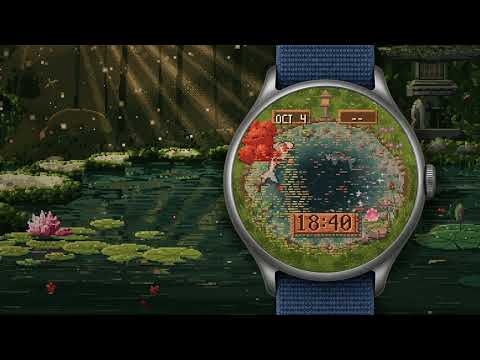
A koi pond drawn pixel by pixel lives under your watch glass. Koi swim their routes beneath a carved wooden plank that tells the time, lily pads drift, and the water follows your real day.
What you get
• Koi on their own routes, with a deep grey-blue koi below and a pale ghost koi after dark.
• Tap the water and a koi rises to eat the food you drop.
• Tilt your wrist and the sunlight slides across the pond.
• Clock: carved plank (digital) or reed hands (analogue).
• Three koi colour options: Kohaku, Showa and Autumn gold.
• Two complications (small info spots) on signposts by the water: the date and the next sunrise or sunset by default, or any short text, range, image or icon you choose.
Why it stands out
• The pond follows the real sky. With weather on your watch it knows when the sun really sets tonight, so morning light, the golden evening and nightfall arrive on time. At night the stone lantern lights, the moon's reflection shows its true phase and fireflies blink along the bank.
• Your weather falls on the water: rain dimples, snow, mist and cloud shadows.
• Your day grows on the pond: a lily pad opens at each step milestone, up to six by 10,000 steps; the lotus glows with your heart rate; a leaf drifts across every hour and a ripple marks every minute.
• Always-on display: lower your wrist and the pond freezes over, with the koi asleep under the ice and the time on a frosted plank. Raise it and the ice melts away.
Make it yours Hold the face, then tap Customise: clock, koi, tap to feed, live weather, real daylight, fireflies at night, and lily pads that grow with steps.
What it needs Wear OS 7 or later, round watches. Uses your watch's weather, steps and heart rate when they are available; without them the pond keeps a gentle 06:00 to 18:30 day and everything else still works. The watch face works independently. No Pixelpond account or full Pixelpond app is needed.
Optional phone Setup guide Pondglass · Setup is an optional guide for installing, selecting and updating this face. It includes a genuine animated watch preview, Pause and Less motion controls, help and the privacy policy. Install the watch face separately through Google Play; installing Setup does not install or select it on your watch. The phone guide requires Android 7.0 or newer. Preview colours and lighting may differ from your watch.
What you get
• Koi on their own routes, with a deep grey-blue koi below and a pale ghost koi after dark.
• Tap the water and a koi rises to eat the food you drop.
• Tilt your wrist and the sunlight slides across the pond.
• Clock: carved plank (digital) or reed hands (analogue).
• Three koi colour options: Kohaku, Showa and Autumn gold.
• Two complications (small info spots) on signposts by the water: the date and the next sunrise or sunset by default, or any short text, range, image or icon you choose.
Why it stands out
• The pond follows the real sky. With weather on your watch it knows when the sun really sets tonight, so morning light, the golden evening and nightfall arrive on time. At night the stone lantern lights, the moon's reflection shows its true phase and fireflies blink along the bank.
• Your weather falls on the water: rain dimples, snow, mist and cloud shadows.
• Your day grows on the pond: a lily pad opens at each step milestone, up to six by 10,000 steps; the lotus glows with your heart rate; a leaf drifts across every hour and a ripple marks every minute.
• Always-on display: lower your wrist and the pond freezes over, with the koi asleep under the ice and the time on a frosted plank. Raise it and the ice melts away.
Make it yours Hold the face, then tap Customise: clock, koi, tap to feed, live weather, real daylight, fireflies at night, and lily pads that grow with steps.
What it needs Wear OS 7 or later, round watches. Uses your watch's weather, steps and heart rate when they are available; without them the pond keeps a gentle 06:00 to 18:30 day and everything else still works. The watch face works independently. No Pixelpond account or full Pixelpond app is needed.
Optional phone Setup guide Pondglass · Setup is an optional guide for installing, selecting and updating this face. It includes a genuine animated watch preview, Pause and Less motion controls, help and the privacy policy. Install the watch face separately through Google Play; installing Setup does not install or select it on your watch. The phone guide requires Android 7.0 or newer. Preview colours and lighting may differ from your watch.
A living pixel-art koi pond: real daylight, live weather and tap to feed.
Updated on
Featured stories

Safety starts with understanding how developers collect and share your data. Data privacy and security practices may vary based on your use, region, and age. The developer provided this information and may update it over time.
- No data shared with third partiesLearn more about how developers declare sharing
- This app may collect these data typesLocation, Financial info and 2 others
- Data is encrypted in transit
- Data can’t be deleted


What’s new
Updated the live preview to match the clearer pond, larger swimming koi and new evening and night light. Includes installation, customisation and update help. Install the watch face separately on a Wear OS 7 watch.
Everyone
Learn moreApp support
About the developer
BRADY MITCHELL
business@pixelpond.au
14 ASPLIN CCT
MERNDA VIC 3754
Australia
+61 435 141 087

